How a paid Discord server works
You don’t need a second server. Most paid communities keep a free area where anyone can say hello, and a members area that only one role can see.
- Create a role, for example Members.
- Make your paid channels visible only to that role.
- Connect a payment tool that gives the role when someone pays and takes it away when they stop.
Step 3 is the one you don’t want to do by hand. Without it, people who cancel keep the role until you notice.
Your options
| Option | Who can use it | Cost | Sell other things too |
|---|---|---|---|
| Discord Server Subscriptions | US-based owners with US banking and ID | Discord keeps 10% (a 90/10 split); other fees can apply | ◐Discord’s Server Shop, inside Discord |
| NiceFunnel | Creators in 39 Stripe countries | $0 a month + 5% per sale, or $25 a month ($250 a year), 0% per sale | ✓Downloads, courses, 1:1 calls, email list |
| LaunchPass | Owners with a Stripe account | $29 a month per community + 3.5% per payment | –Communities only |
Card processing comes on top for the bot services. Compare the totals for your size with the membership fee calculator, or read NiceFunnel vs LaunchPass for a side-by-side.
What a paid Discord server costs at each size
Platform fees per month for a server charging $10 a month. Percentage fees grow with every member; a flat fee doesn’t.
| Members | NiceFunnel | LaunchPass $29 + 3.5% | Discord 10% |
|---|---|---|---|
| 10 $100 sales | $5 Free | $32.50 | $10 |
| 25 $250 sales | $12.50 Free | $37.75 | $25 |
| 50 $500 sales | $25 Free | $46.50 | $50 |
| 100 $1,000 sales | $25 Creator | $64 | $100 |
| 250 $2,500 sales | $25 Creator | $116.50 | $250 |
Discord’s option is for US-based owners only and other fees can apply. Stripe’s card processing (2.9% + 30¢ per payment in the US) is added on LaunchPass and NiceFunnel. Try your own numbers in the fee calculator.
Discord Server Subscriptions: good if you're in the US
Discord’s built-in option lets members subscribe without leaving the app, and Discord keeps 10%. If you’re a US-based owner and your audience lives inside Discord, it’s worth a look.
- US only. Discord says Server Subscriptions will not be available outside the United States.
- Your audience stays Discord’s. You don’t get member emails, so you can’t follow up, sell a course, or move people elsewhere.
- One place to sell. If you also sell downloads, coaching calls or a course, they live somewhere else with a separate checkout.
Set up a paid Discord server with NiceFunnel
You need a Discord server where you can manage roles, and about 10 minutes. The NiceFunnel bot asks only for Create Invite, Kick Members and Manage Roles. It doesn’t read messages and never DMs your members.
Create your free NiceFunnel account
Pick your page address, like
nicefunnel.com/yourname. No card needed.Create a membership
Go to Products → Add product → Membership, set a monthly price (from $1.99) and describe what members get.
Connect Stripe
Members pay into your own Stripe account. Stripe pays out to your bank.
Connect your Discord server
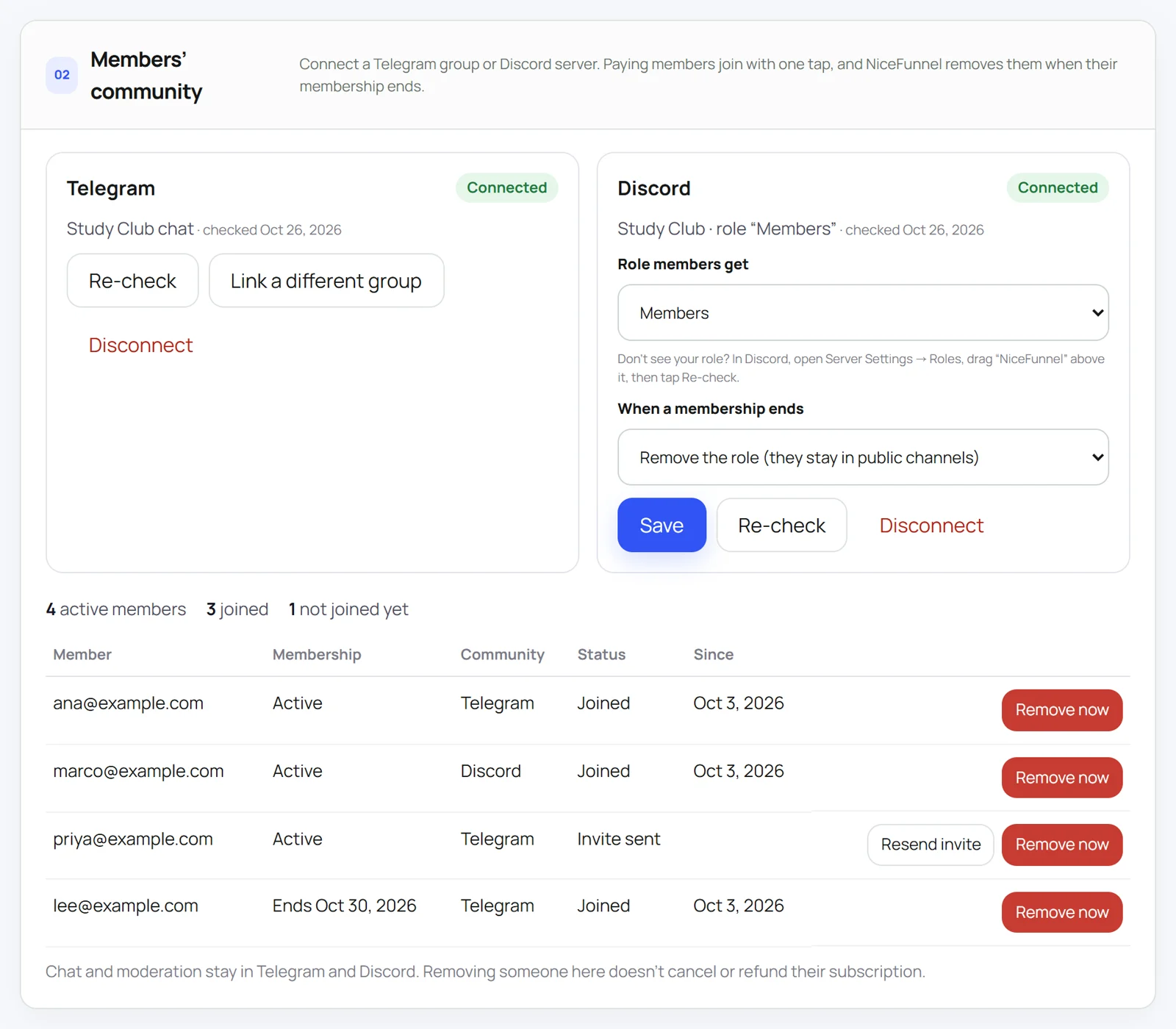
Save the membership, then open Members’ community and tap Connect Discord server. Discord asks which server to add the NiceFunnel bot to. Pick yours and approve.
Pick the members role
Back in NiceFunnel, choose the role paying members get, and what happens when a membership ends: remove the role (they stay in your public channels) or remove them from the server.
Only roles below the NiceFunnel bot’s role are listed. If yours is missing, drag NiceFunnel above it in Server Settings → Roles and tap Re-check.
Publish and share your link
Share
nicefunnel.com/yournamein your public channels, bio and videos. Members pay, tap Connect on their membership page, and land in your server with the role.
Sell your members role today
Start on Free and pay nothing until you sell. Switch to Creator when 5% of your sales passes $25 a month.
Lock the paid channels
The role only matters if your channels respect it. For each members-only channel or category:
- Open the channel’s Edit Channel → Permissions.
- Turn Private Channel on (or deny View Channel for @everyone).
- Add your Members role and allow View Channel.
Set the permissions on the category and sync the channels to it. New paid channels you add later are locked automatically.
Keep one public channel that explains what members get, with your NiceFunnel link pinned. That’s where most new members will come from.
What happens when someone stops paying
| What happens | Their role |
|---|---|
| They cancel | Kept until the end of the month they paid for, then removed. |
| Their card fails | Kept while Stripe retries. Removed if the subscription ends. |
| Full refund or a bank dispute | Removed. |
| You remove them yourself | Removed now. Their subscription keeps running until you cancel or refund it. |
Changes happen about five minutes after Stripe tells NiceFunnel. Your member list in NiceFunnel shows who joined, who hasn’t yet, and who was removed, with a button to remove someone right away.
What to offer and what to charge
- Sell a result, not access. “Weekly portfolio reviews” or “a study group that meets every Sunday” is easier to buy than “VIP channels”.
- Show the inside. A public channel with a sample post or last week’s highlights does more than a feature list.
- Start with one price. Add a higher tier only when members ask for more of you, such as calls or feedback.
- Pair it with something to keep. A guide or short course next to the membership gives people a reason to buy today.
What other paid servers charge
We looked at 11 paid Discord memberships on LaunchPass, Whop and Patreon in October 2026. Eight charged between $10 and $30 a month; the other three charged $40 to $50 and offered more of the creator’s time, like feedback or coaching. Patreon tiers that include a Discord role often start lower, at $1 to $5, because the Discord is one perk among several.
If you’re unsure, start around $10 to $15 and raise it once members tell you what they value most.
Paid signals or personal financial advice can need a licence where you or your members live, and Stripe restricts some of these businesses. Check before you charge.
Get your first paying members
Most first members come from people who already know you. Before you promote anywhere new:
- Tell your current server. Post what the members area is, what happens there each week, and the price. Pin it in your public welcome channel.
- Show one real example. Share a sample post, a recorded call snippet or last week’s highlights so people see what they’d get.
- Put the link where people already look. Your bio, video descriptions, newsletter footer and the end of your streams. One page link works everywhere, so you don’t need a separate link per platform.
- Give it a start date. “The first members call is Sunday” gives people a reason to join this week instead of someday.
- Ask the first 5 why they joined. Use their words on your page. It’s the best sales copy you’ll get.
Selling a guide or a short course alongside the membership helps too: it gives people who aren’t ready for a monthly price something to buy. See how paid communities work on NiceFunnel.
If a member paid but has no role
NiceFunnel shows a Needs attention note on the membership when it can’t give or remove a role. The usual causes:
| What you see | Fix |
|---|---|
| The bot’s role is below the members role | In Server Settings → Roles, drag NiceFunnel above your members role, then tap Re-check. |
| The members role was deleted | Pick a role again in the membership’s community settings. |
| The bot was removed from the server | Connect the same server again from the membership. Your role choice is kept. |
| The member hasn’t connected Discord yet | Ask them to open their membership page and tap Connect. Your member list shows who hasn’t joined. |
| Two memberships use one Discord account | NiceFunnel flags it instead of letting the second one in. Ask the member to use their own account. |
If you removed someone by mistake while they’re still paying, tap Restore in the member list.
Questions people ask
Can I use Discord's own Server Subscriptions outside the US?
No. Discord's Creator Revenue FAQ says Server Subscriptions are only for US-based users who can provide US banking information and identification. Outside the US you need a bot-based service such as NiceFunnel, LaunchPass or Whop.
Do members need to leave and rejoin my server?
No. If a paying member is already in your server, NiceFunnel just adds the members role. If they're not in it yet, connecting Discord on their membership page adds them to the server with the role.
What permissions does the NiceFunnel bot need?
Create Invite, Kick Members and Manage Roles. It doesn't read messages, doesn't need any privileged intents, and never sends direct messages to your members.
Why can't I pick my members role?
Discord only lets a bot give roles that sit below its own role. In Server Settings, open Roles, drag NiceFunnel above your members role, then tap Re-check in NiceFunnel.
Can I kick people instead of removing the role?
Yes. For each membership you choose what happens when it ends: remove the role (they stay in your public channels) or remove them from the server.
Who holds the money?
You do. Members pay through your own Stripe account and Stripe pays out to your bank. On the Free plan NiceFunnel takes 5% per sale; on Creator ($25 a month) it takes 0%.
Can I offer a yearly price or a free trial?
Not yet. NiceFunnel memberships are billed monthly today. You can open with a lower launch price for your first members.
Is it against Discord's rules to charge for access?
Discord sells role-based access itself through Server Subscriptions, and many servers sell access through outside services. Discord's Community Guidelines still apply to your server: they ban selling Discord assets such as accounts, servers, server permissions or custom invite links. Sell your content, help and community, not admin or moderator powers, and read Discord's Monetization Policy before you start.
How do I make a paid Discord server for free?
Start on NiceFunnel's Free plan: $0 a month and 5% per sale, plus Stripe's card processing. You pay nothing until someone buys. Switch to Creator ($25 a month, 0% per sale) when 5% of your sales passes $25, which happens at $500 a month.
How much should I charge for a paid Discord server?
Of 11 paid Discord memberships we checked on LaunchPass, Whop and Patreon in October 2026, 8 charged between $10 and $30 a month and the rest $40 to $50. Patreon tiers that include a Discord role often start at $1 to $5. Price by what members get from you, such as feedback, calls or a weekly session, not by the number of channels.
Can I sell more than one tier?
Yes. Create a membership for each tier and connect the same server to each one, picking a different role per tier, for example Members and VIP.
How many members do I need before it's worth paying for a tool?
None on NiceFunnel Free, since there's no monthly fee. LaunchPass charges $29 a month per community before your first sale. At $10 a month per member, NiceFunnel Creator becomes cheaper than Free at 50 members.
Keep reading
Sources
Prices and rules were checked on October 26, 2026. Platforms change their pricing; check their pages before you decide. Price ranges for other servers come from 11 public LaunchPass, Whop and Patreon pages we checked in October 2026.
Start your paid Discord server
Membership, checkout, automatic roles and a page to share. Set up in about 10 minutes.
Start freeNo card needed. Upgrade to Creator ($25/month, 0% per sale) only when it saves you money.